 RunLogos
Introduction
RunLogos is a native desktop application (Mac + Windows) built around the OpenLogos methodology — a structured way to build software with AI that produces correct, tested, and traceable code.
OpenLogos is the open-source methodology. RunLogos is the professional workbench that makes every artifact it produces visual, editable, and executable.
The problem: Vibe Coding
When you tell AI "build a login feature" without context, every decision is a guess: requirements, UI design, API structure, edge cases, error handling. AI generates code quickly but it's riddled with assumptions, missing edge cases, and undocumented decisions. Documentation drifts. Tests are an afterthought. Changes break things nobody remembers.
This is Vibe Coding: fast to start, painful to finish.
The solution: the Spec Chain
RunLogos solves this by building a Spec Chain before a single line of code is written:
Requirements → Prototype → Scenarios → API → Schema → Tests → Code → Verify → Change
Each layer derives from the one before it. By the time AI writes code, every decision has already been made, recorded, and verified. No guessing. No hallucination.
What RunLogos does at each phase
Phase 1 · Requirements
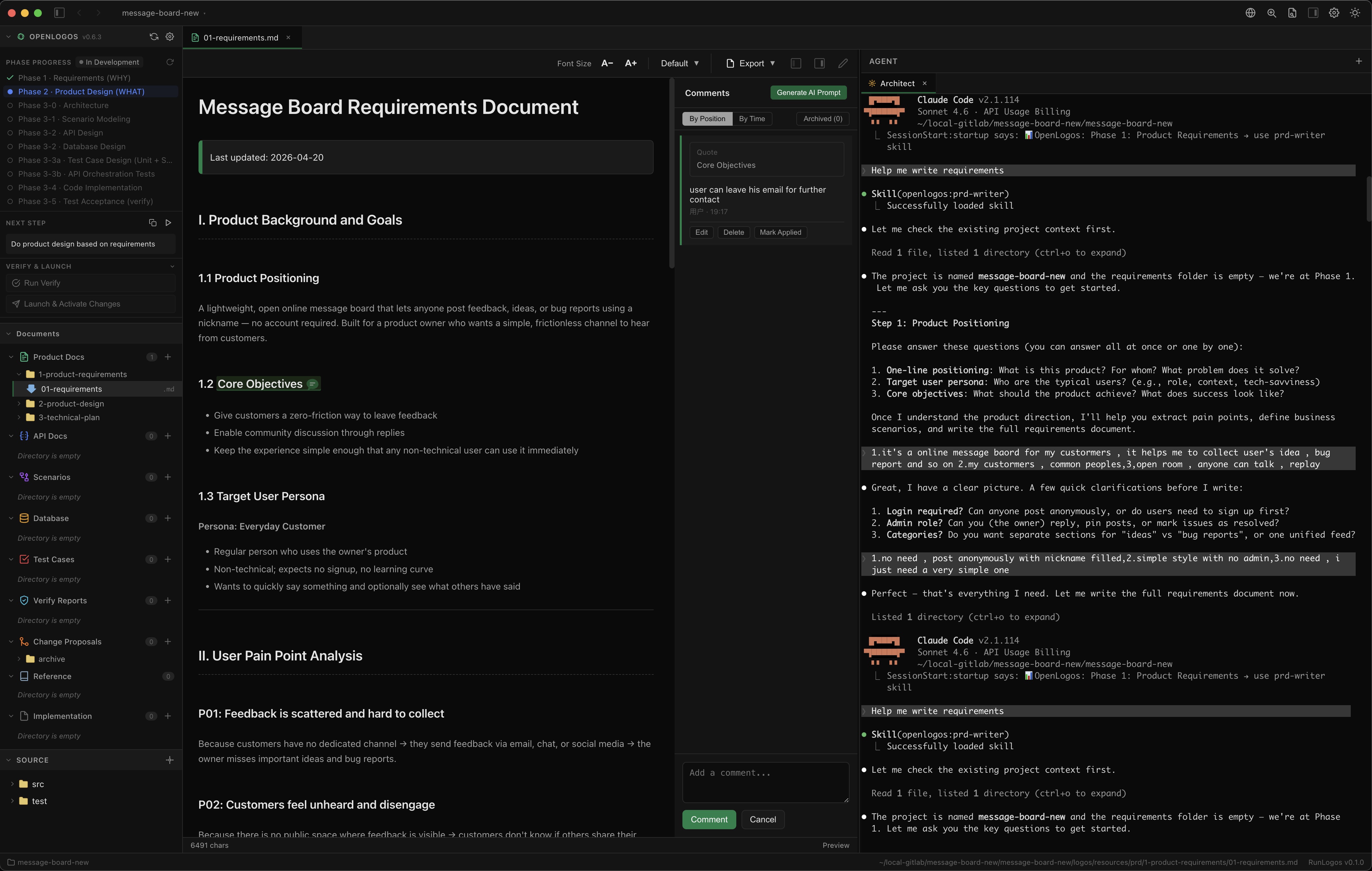
The Markdown editor renders your requirements.md with full formatting, Mermaid diagrams, and a scroll-synced TOC. Comment-to-Prompt lets you highlight any text, leave an inline comment, and generate a structured AI instruction from it — turning review notes into precise prompts without copy-pasting.
Phase 2 · Product Design
The built-in browser (Electron webview) previews your HTML prototype directly inside RunLogos — no external browser needed. The design Skill also produces a Markdown design document alongside the prototype; Comment-to-Prompt is available there for annotating and refining the design.
Phase 3 · Scenario Mapping
The Markdown editor renders Mermaid sequence diagrams so you can visually trace every actor, API call, and edge case. Edit the Mermaid source directly and the diagram updates live.
Phase 4 · API Design
The OpenAPI visual editor (Pro) shows all endpoints in a left-side list organized by tag. Select any endpoint to see its full Definition — path params, query params, headers, request body schema, and response schemas — all in a tree editor. Switch to the Debug tab to send a live request and inspect the raw response without leaving the app.
Phase 5 · Database Design
The SQL Designer (Pro) gives you a visual field and index editor for every table. It auto-generates DDL for MySQL, PostgreSQL, or SQLite, exports full HTML documentation, and can generate MyBatis boilerplate (Entity, Controller, Service, Mapper, Mapper XML) directly from your schema.
Phase 6 · Test Design
Test cases are Markdown documents — the editor renders them with full formatting and Comment-to-Prompt support. Annotate specific cases to generate targeted AI prompts for refinement.
Phase 7 · Code Generation
Once the Spec Chain is complete, RunLogos provides a full IDE-like environment for the generated code: Monaco editor with syntax highlighting for 20+ languages, a file tree, and a bottom terminal panel with multi-tab PTY sessions. Error lines in terminal output are clickable — they jump directly to the file and line in the editor.
The Agent Panel is a core capability here: a collapsible right-side panel that runs Claude Code, OpenCode, or a plain terminal session side-by-side with your code. You can drag file paths from the file tree directly into the agent terminal. Working on the same screen — reading code on the left, running AI on the right — dramatically reduces context-switching.
Phase 8 · Verification
Run openlogos verify from the terminal panel and RunLogos renders the CLI output as a structured report covering three layers:
- Pass rate — how many test cases passed
- Design-time coverage — every test case defined in the Spec Chain was actually executed
- AC traceability — requirements → test cases → results, end to end
Phase 9 · Change Proposals
Change proposals are Markdown documents in logos/changes/. Edit them in the Markdown editor, use Comment-to-Prompt to annotate impact areas, and generate precise AI prompts for propagating the change through the Spec Chain.
The API Orchestration Runner
The Orchestration Runner is a standalone module that sits outside the phase sequence. AI generates a JSON orchestration config describing a sequence of API calls — the business flow you want to validate. RunLogos provides a visual editor for that config and a built-in execution engine that runs the sequence and shows you the raw HTML request and response for every API call in the chain.
This is how you validate that your entire business flow works end-to-end, not just individual endpoints.
Comment-to-Prompt
Comment-to-Prompt works across all Markdown documents in RunLogos — requirements, product design, architecture, scenario mappings, test cases, change proposals. Highlight any text, leave a comment in the sidebar, and generate a structured AI prompt. It turns imprecise review feedback into precise AI instructions.
The integrated working environment
The biggest productivity gain in RunLogos isn't any single feature — it's the layout. The three-panel workspace puts everything you need on one screen:
- Left — file tree: navigate your entire project, drag any file path directly into the agent
- Center — viewer/editor: the document or code you're working on, rendered and editable
- Right — Agent Panel: a full Claude Code, OpenCode, or terminal session running alongside
This means you can read a requirement, spot an issue, highlight it with Comment-to-Prompt to generate a precise instruction, and hand it to the agent — all without switching windows or losing context. The agent sees the same project structure you do. You stay in flow.
What's next
- Installation — Download and install RunLogos on your machine
- Activate License — Enter your license key and unlock full access
- Quick Start — Build your first project in under 5 minutes